
How-to: Rename A Chat Conversation
To rename a chat, click on the three dots next to the chat and select 'Rename.' The chat name will become an editable input field where you can enter the n
Updated September 8, 2026
To rename a chat, click on the three dots next to the chat and select 'Rename.' The chat name will become an editable input field where you can enter the new name. Simply click outside the field to save the changes.
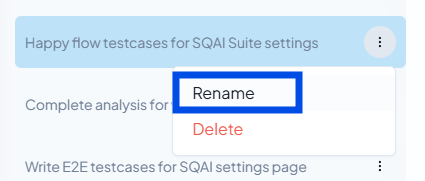
The rename button for a specific chat
Related Articles
Did this answer your question?