
Info: Single Sign-On (SSO) for SQAI Suite
SQAI Suite (all modules) Audience: IT administrators and identity administrators at customer organisations Feature availability: SSO is an optional, paid add-on to your SQAI Suite subscription
Updated September 10, 2026
SQAI Suite supports multi-tenant single sign-on. SQAI Suite is already registered as a multi-tenant application with the identity provider, so there is nothing for you to build. To enable SSO we activate your domain name on our side, your identity administrator grants consent once, and your users can sign in immediately with their existing corporate account.
You do not need to:
create an app registration, enterprise application or service principal from scratch;
generate, exchange or rotate client secrets or certificates;
expose anything to the internet or open firewall ports;
run a synchronisation job or upload a user list.
You keep full control over who can sign in, because authorisation is driven by the groups and claims you already manage in your own identity provider (IdP).
1. Overview
1.1 What SSO gives you
Without SSO | With SQAI Suite SSO |
Separate SQAI Suite username and password per user | Users sign in with their existing corporate account |
Password policy managed in two places | Your password, MFA and Conditional Access policies apply |
Offboarding requires a separate action in SQAI Suite | Disabling the account in your IdP removes access |
Access changes are requested from SQAI support | Access changes are made by you, in your own IdP |
Users manage another credential | Nothing extra to remember |
1.2 The multi-tenant model
A traditional SSO integration is per customer: each organisation registers the application in its own tenant, configures redirect URIs, generates a secret, and maintains that registration over time. That is a project, and it produces long-term administrative overhead on both sides.
SQAI Suite instead ships as a single multi-tenant application. One registration, maintained by us, is trusted by many customer tenants. When you enable SSO:
We add your verified domain (or domains) to your SQAI Suite tenant configuration.
Your identity administrator consents to the SQAI Suite application once.
A service principal for SQAI Suite appears automatically in your tenant, under your enterprise applications.
From that moment on, sign-in works, and you administer it like any other enterprise application you own.
The result is a switch that gets flipped rather than an integration that gets built. Typical elapsed time from request to first successful sign-in is measured in minutes, not weeks.
1.3 Supported identity provider
Identity provider | Protocol | Status |
Microsoft Entra ID (formerly Azure AD) | OpenID Connect | Supported, multi-tenant (no app registration needed) |
The remainder of this article uses Microsoft Entra ID for the concrete examples, because it is the most common case and the one where the multi-tenant model removes the most work.
2. How it works
2.1 Sign-in flow
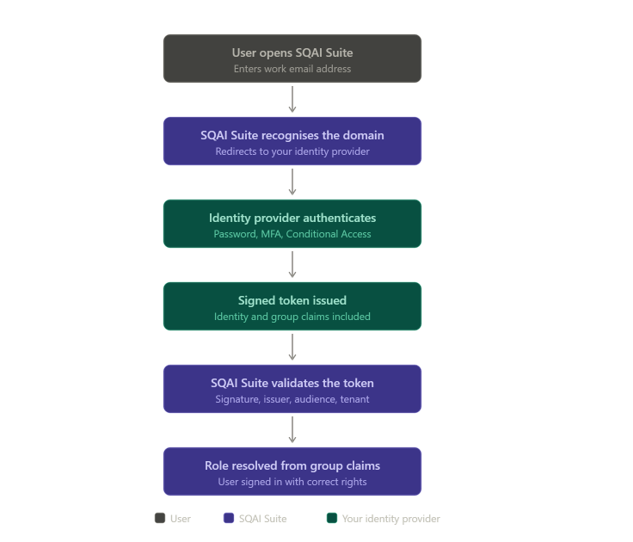
Key points:
Home realm discovery is based on the email domain. The user types their work email address; SQAI Suite recognises the domain as SSO-enabled and redirects to your IdP. This is why domain activation is the core of the setup.
Credentials never reach SQAI Suite. Authentication happens entirely at your IdP. SQAI Suite receives a signed token, never a password.
Every sign-in is a fresh policy evaluation. MFA prompts, device compliance, sign-in risk and Conditional Access are all applied by your IdP at the moment of sign-in.
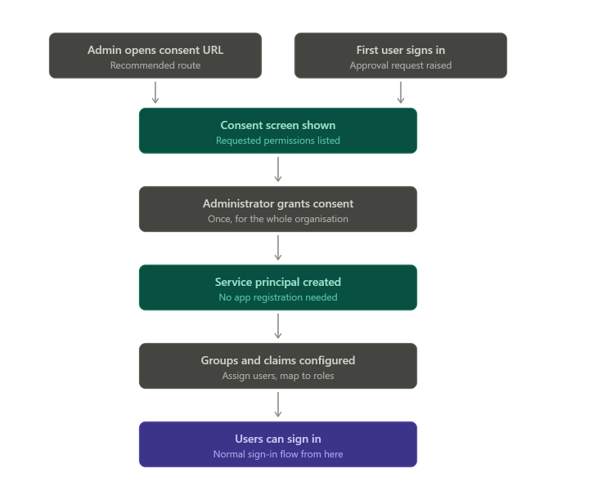
This happens once per tenant, and there are two ways into it: your administrator opens the consent URL deliberately, or a regular user tries to sign in first and triggers an approval request. Both land in the same place.
2.2 What SQAI Suite stores
On first successful sign-in, SQAI Suite creates a user record from the token claims (just-in-time provisioning). It stores:
the immutable user identifier from your IdP (used to link the account);
display name, given name, family name;
email address / UPN;
SQAI Suite-specific application data (preferences, audit trail, records the user created).
SQAI Suite does not store passwords, MFA secrets or authentication factors for SSO users.
3. Prerequisites
Before requesting activation, confirm the following.
# | Requirement | Notes |
1 | An active SQAI Suite subscription with the SSO add-on | Contact your account manager if unsure |
2 | One or more verified domains in your IdP | Users' email addresses must be on these domains |
3 | A user with sufficient rights to grant tenant-wide admin consent | In Entra ID: Global Administrator, Privileged Role Administrator, or Cloud Application Administrator |
4 | A named technical contact for the activation | We coordinate the cut-over with this person |
Related Articles
Did this answer your question?